Showing posts with label SAPLL2; sapllearns;. Show all posts

Thing #21 Podcasting


The word podcast is used to refer to a non-musical audio or video broadcast that is distributed over the Internet. What differentiates a podcast from regular streaming audio or video is that the delivery method for podcasts is often done automatically through RSS or serialized some other way. In 2005, "podcast" was named the "word of the year" by New Oxford American Dictionary and with the growth of podcasting over the last few years, it's easy to see why.

Podcasts take many forms, from short 1-10 minutes commentaries to much longer in person interviews or panel group discussions. There’s a podcast out there for just about every interest area and the best part about this technology is that you don’t have to have an iPod or a MP3 player to access them. Since podcasts use the MP3 file format, a popular compressed format for audio files, you really just need a PC (or portal device) with headphones or a speaker.

Tunes, the free downloadable application created by Apple is the directory finding service most associated with podcasts, but if you don’t have iTunes installed there are still plenty of options. For this discovery exercise participants are asked to take a look at some popular podcast directory tools. Do some exploring on your own and locate a podcast that is of interest to you. Once found, you can easily pull the RSS feed into your Google Reader account as well, so that when new casts become available you’ll be automatically notified of their existence.

Discovery Resources:

Discovery Exercise:

  1. Take a look at one or two of the podcast directories listed and see if you can find a podcast that interests you. See if you can find some interesting library related podcasts here like book review podcasts or library news.

  2. Add the RSS feed for a podcast to your Google Reader account

  3. Create a blog post about your discovery process. Did you find anything useful here?

Optional: If you're super-ambitious, why not try out a podcasting service and add an audio post about your experience to your blog. (see Jamie's audiopost on Library 2.0 as an example)

Thing #20 You Too Can YouTube


Within the past year online video hosting sites have exploded allowing users to easily to upload and share videos on the web. Among all the web 2.0 players in this area, YouTube is currently top dog serving up over 1 million video views a day and allowing users not only to upload their own video content easily, but also embed clips into their own sites easily.

Do some searching around YouTube yourself and see what the site has to offer. You'll find everything from 1970s TV commercials and 60s music videos to library dominos and kids singing about bloopers here. Of course, like any free site you’ll also find a lot stuff not worth watching too. Explore and see for yourself what the site has too offer. :)

Discovery Exercise:

  1. Explore YouTube & find a video worth adding as an entry in your blog.

  2. Create a blog post about your experience. What did you like or dislike about the site and why did you choose the video that you did? Can you see any features or componets of the site that might be interesting if they were applied to library websites?

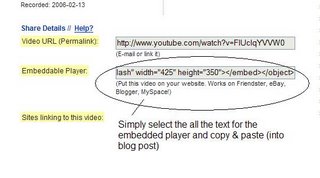
    OPTIONAL: Try placing the video inside your blog using the copy and paste code for the for "Embeddable Player.” Note: you'll need to use Blogger's Edit HTML tab when pasting this code.


Other popular video hosting sites:

Thing #19: Add to your 2.0 Toolbox


Throughout the course of this Learning 2.0 program we’ve explored just a small sampling of these new internet technologies and websites that are empowering users with the ability to create and share content. If we had more time there are so many more we could explore. Time will tell which of these new collaborative, social networking and information tools will remain on top, but one thing is certain, they're not going to go away (at least anytime soon).

For this discovery exercise, participants are asked to select any site from this list of Web 2.0 Awards nominees and explore it. With so many to choose from, it might be handy to first select a category that interests you (like Books or Personal Organization) and then select a tool/site to explore. Be careful to select a tool that is Free and that doesn't require a plug-in or download. The majority of these free, so this shouldn’t be a problem.

Discovery Exercise:
  1. Select any site/tool from the list of Web 2.0 Awards nominees. (If you prefer to select from just the winners, here’s a link to the short list.)

  2. Explore the site you selected.

  3. Create a post about your discovery. What did you like or dislike about the tool? What were the site’s useful features? Could you see any applications for its use in a library setting?

Thing #18 Online Apps

The availability and use of online productivity web-based applications (think word processing and spreadsheets) has exploded over the past few years and for good reasons! These powerful applications provide users with the ability to create and share documents over the internet without the need of installed desktop applications.

Some experts speculate that this emerging trend may mean the death to Microsoft Office and other software-based productivity tools. Already, many new small and affordable laptops (called Netbooks) do not come with office suites, instead using free online applications. This makes them much more affordable than laptops with expensive software preloaded. Others think web-based applications have their place, but not in the office, citing difficulty in securing information online. But no matter which side of the office suite platform you side with, on this both sides seem to agree; web-based apps have their place.

One large benefit to web-based applications it that they eliminate the need to worry about different software versions or file types as you email documents or move from PC to PC. Another bonus is that they easily accommodate collaboration by allowing multiple users to edit the same file (with versioning) and provide users the ability to save and convert documents as multiple file types (including HTML and pdf). And, you can even use many of these tools, such as Zoho Writer and Google Docs (formerly known as Writely) to author and publish posts to your blog. It’s this type of integration with other Web 2.0 tools that makes web-based apps so appealing.

For this discovery exercise, participants are asked to take a look at a web-based word processing tool called Google Docs, create a simple document and then document your discoveries in your blog. If you're up to the challenge, you might even export your document as a web page or publish it to your blog.

With web-based applications, the possibilities are endless.

Discovery Resources:


A short list of web-based productivity applications – Note: Created in Google Docs, then clicked "Share", and "Publish as web page".

Discovery Exercise:
  1. Create a free account for yourself in Google Docs (you should be able to use your Blogger account).

  2. Explore the site and create a couple test documents, spreadsheets, or presentations.

  3. Try out a few features (maybe Share or Publish), and create a blog post about your discoveries.

    • Can you imagine using this at work? What about in your personal life?


Thing #17 Hands-on Exercise: Playing in a Wiki Sandbox

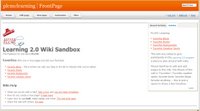
"Sandbox" is the term that wikis often use to describe the area of the website that should be used for pure play. For this discovery and exploration exercise, there's a whole Learning 2.0 Favorites wiki* that’s for nothing but play!

For this “explore-and-play-with-wikis” exercise, you are asked to add an entry or two to the PBwiki Learning 2.0 wiki. The theme of this wiki is simply “Favorites” : Favorite books, favorite vacation spots, favorite restaurants, favorite anything …all you need to do is play and add your thoughts. To mark your adventure on this site, you should add your blog to the Favorite Blogs page.

Discovery Resources

Discovery Exercise

  1. Access the PLCMC Learning 2.0 wiki and create a login account for yourself. The password is on the bottom of the login page: plcmc.
  2. Add your blog to the Favorite Blogs page (look for the San Antonio Public Library logo toward the end of the page). That's how we'll know that you've been there. It’s easy to do if you follow this simple syntax (11/24 UPDATE: the all-text instructions below will only work if you switch to the "classic" editing mode. The default is the WYSIWYG mode. Try both. See which one you like. You won't break anything!):
    Example:

    [ URL Title of blog]

    [ http://plcmclearning.blogspot.com/ Learning 2.0 ]

    With brackets [ ] and just a little typing, you’ve added a link - yup, it’s as easy as that! (If you don't want to do it old-school style, there's a handy WYSIWYG editor, too.)

    OPTIONAL: Add a favorite or two to a few other pages (Favorite books, favorite vacation spot, etc). And, if you feel up to the challenge, you might even want to create a separate page for book reviews or short travel essays and link up to that.

  3. Create a post in your blog about the experience.

* NOTE: The PLCMCLearning Wiki was created using the free version of PBWiki, a tool that lets you create webpages that anyone can edit.

Thing #16 Wiki-mania


A wiki is a collaborative website and authoring tool that allows users to easily add, remove and edit content. Wikipedia, the online open-community encyclopedia, is the largest and the most well known of these knowledge sharing tools. With the benefits that wikis provide, the use and popularity of these tools is exploding.

Some of the benefits that make wikis so attractive are:

  • Anyone (registered or unregistered, if unrestricted) can add, edit or delete content.
  • Tracking tools within wikis allow you to easily keep up on what has been changed and by whom.
  • Earlier versions of a page can be viewed and reinstated ("rolled back") when needed.
  • Users do not need to know HTML in order to apply styles to text or add and edit content. In most cases simple syntax structure is used.

As the use of wikis has grown over the last few years, libraries all over the country have begun to use them to collaborate and share knowledge. Among their applications are pathfinder or subject guide wikis, book review wikis, ALA conference wikis and even library best practices wikis.

Discovery Resources

Use these resources to learn more about wikis:


Discovery Exercise
  1. So what's in a wiki? Find out by doing some exploring on your own. For this discovery exercise, you are asked to take a look at some library wikis and blog about your findings. Here’s a few examples to get you started:

  2. Create a blog post about your findings. What did you find interesting? What types of applications within libraries might work well with a wiki?

Thing #15 More on 2.0

Library 2.0 is term used to describe a new set of concepts for developing and delivering library services. The name, as you may guess, is an extension of Web 2.0 and shares many of its same philosophies and concepts including harnessing the user in both design and implementation of services, embracing constant change as a development cycle over the traditional notion of upgrades, and reworking library services to meet the users in their space, as opposed to ours (libraries).

Many have argued that the notion of Library 2.0 is more than just a term used to describe concepts that revolve around the use of technology. It also a term that can be used to describe both physical and mindset changes that are occurring within libraries to make our spaces and services more user-centric and inviting. Others within the profession have asserted that libraries have always been 2.0: collaborative, customer friendly and welcoming. No matter which side of the debate proponents fall, both sides agree that libraries of tomorrow, even five or ten years from now, will look substantially different from libraries today.


Discovery Resources:

OCLC Next Space Newsletter, analyzing Libraries and the Future.

Five Perspectives:

Wikipedia – Library 2.0

Library 2.0 Discussions (list of great references from Wikipedia)

And finally... a librarian's 2.0 Manifesto.

Discovery Exercise:
  1. Read two or three of the perspectives on Library 2.0 from the list above.
  2. Create a blog post about your thoughts on any one of these? Library 2.0 - It's many things to many people. What does it mean to you?


Thing #2 The 7 1/2 Habits of Lifelong Learning

Among libraries, lifelong learning is one of those core values we shelve our books by. So it makes sense that before we embark on this online learning and discovery journey that we take a few minutes to review a few habits of lifelong learners.

These habits, which we’ve called the Seven 1/2 habits of lifelong learners, will provide you with a refresher on what it means to be a lifelong learner.

Discovery Exercise:
  1. Make sure you have headphones or speakers attached to your computer.
  2. Check out this tutorial to learn the 7 1/2 habits: http://www.plcmc.org/public/learning/player.html.
  3. As you watch and listen, write down which habit among the 7 & 1/2 that is easiest for you and which is hardest. You will use your personal blog (which you will set up in the next lesson) to post your thoughts about lifelong learning.
Have fun! If you haven't jumped on board yet, it's never too late to become a lifelong learner.


Next Up: Creating your blog so you can begin tracking your journey. Several staff have already taken a jump start on this activity, so if you're up to it why not join the early bird crowd.

Thing #1 Discovery has never been so much fun ...

Powered by Podbean.com


Welcome to SAPL's Learning 2.0 program & blog. Chances are if you've found your way here you're either:

  • a member of SAPL's staff who's participating in the Learning 2.0 Challenge.
  • interested in learning about and playing around (yes, playing is allowed in libraries) with some new Web 2.0 tools that will help you expand your information literacy toolbox.
  • or, you're just interested in earning a cool incentive prize!

Learning 2.0 is online learning program that encourages staff to learn about emerging technologies on the web that are changing the way people, society and libraries access information and communicate with each other.

Over the course of the next eight and a half weeks, this website will highlight “23 Things” and present discovery exercises to help you become familiar with blogging, rss newsfeeds, tagging, wikis, podcasting, online applications, and video and image hosting sites.

To familiarize yourself with this project, be sure to read the About page. The FAQs should answer most of your questions about this program. If not, then please add your question to the this page as a comment.

So fasten your seat belts, grab your mouse and get ready for a discovery adventure… and remember, it's OK to play in the library and have fun!

This was the first of the 23 things. Easy, right? See you in a few days with Thing 2: Lifelong Learning.

Bonus:

Need some selling on the idea? Check out Clay Shirky talking at the Web 2.0 expo on society and change. It's long (about 15 minutes), but worth your time.

It will make you laugh and learn at the same time: